
Built for Dynamics 365 Finance and Supply Chain teams tired of firefighting.
If your Dynamics 365 environment only gets attention after something breaks, you’re already paying for it. You’re paying through downtime, emergency support fees and lost productivity. Your Finance and Supply Chain teams spend time firefighting instead of focusing on the business. Dynamics 365 predictive maintenance flips that model. Instead of waiting for a failure, your platform is continuously monitored and maintained. Updates are planned in advance, so small issues can be identified before they become expensive problems. Below, we break down what predictive maintenance actually looks like for Dynamics 365 Finance and Supply Chain teams, what reactive support really costs, and how to make the switch smoothly.
The Search That Sends You to the Wrong Answer
Type “Dynamics 365 predictive maintenance” into Google, and the results will show you sensors on a factory floor, IoT telemetry, and Field Service technicians dispatched before a machine fails. If you’re a Finance or Supply Chain lead trying to understand why your ERP environment keeps breaking, that’s probably not what you’re looking for. It can easily make predictive maintenance seem unrelated to your Dynamics 365 environment.
It does apply, it’s just describing a different layer of the same platform. Dynamics 365 Asset Management and Field Service use IoT sensor data to predict physical equipment failures. Predictive maintenance for the application itself works differently. It focuses on keeping your Finance and Supply Chain environment healthy through monitoring, planned upgrades and proactive support, not sensors or machinery. Same two words, two different problems (see Microsoft’s own overview of Proactive Quality Updates for how Microsoft defines the platform side of this). Worth clearing up before that distinction gets lost in a conversation with an IT provider.
The Real Cost of Reactive Support
Reactive support looks cheaper on paper, right up until something actually goes wrong. The problem isn’t that downtime is expensive. It’s that the real cost is easy to underestimate until it happens. Proactive support helps businesses identify and address these risks earlier. For a Dynamics 365 environment, that cost shows up in a few predictable ways:
- Emergency support premiums – most partners charge a callout or after-hours rate well above their standard support rate when you’re calling because something’s already broken.
- Lost productivity – Finance staff who can’t close the books, or warehouse staff who can’t process an order, aren’t doing revenue-generating work while they wait.
- Compliance and reporting risk – a system outage during a reconciliation window or a statutory reporting deadline turns an IT problem into a finance leadership problem.
- Compounding fixes – a bug or failed update left unresolved for weeks doesn’t stay small; it tends to affect more transactions and more integrations the longer it sits.
These costs rarely appear as a line item until something goes wrong. That’s why reactive support can feel cheap, until the month it isn’t. The real comparison isn’t a downtime-per-minute figure, it’s asking how many of the four consequences above your business has already absorbed this year without calling it a cost.
Why Proactive IT Support in Australia Is Replacing Reactive Models
This is exactly the gap proactive IT support in Australia is increasingly being built to close, and predictive maintenance is what that shift actually looks like. As more Australian businesses run mission-critical Finance and Supply Chain workloads on Dynamics 365, the same four cost categories above are pushing IT leaders away from break-fix arrangements and toward predictive maintenance instead.
How Predictive Maintenance Works in Practice for Dynamics 365
Predictive maintenance isn’t one action. It’s four disciplines working together continuously:
- Environment monitoring – watching system performance, integration health and error logs in real time, so a developing issue is visible before a user ever reports it.
- Preventative maintenance – routine, scheduled care that keeps the environment healthy. This includes clearing data bloat, checking batch job performance and reviewing configuration drift. It’s the unglamorous work that stops small issues from becoming outages.
- Upgrade planning – mapping out Microsoft’s Platform Updates and Proactive Quality Updates (PQUs) in advance. Updates are tested in a sandbox and applied on a predictable schedule, rather than rushed when a mandatory deadline arrives. Microsoft uses PQUs as its term for cumulative fix packages for Finance & Operations apps.
- Performance optimisation – tuning the system as data volumes and usage grow, so performance degrades gradually and gets addressed, rather than falling off a cliff during your busiest trading period.
Together, these four disciplines are what separate a genuinely predictive environment from one that simply resolves tickets quickly.
Predictive vs. Reactive Support: A Side-by-Side Comparison
| Reactive Support | Predictive Maintenance | |
|---|---|---|
| When issues are found | After a user reports a problem | Before it affects a user |
| Upgrade approach | Rushed, close to Microsoft’s deadline | Planned, tested, scheduled |
| Team’s time | Spent firefighting | Spent on the business |
| Budget | Unpredictable, spikes with incidents | Predictable, fixed monthly scope |
| Business impact | Downtime, missed deadlines | Continuity, fewer surprises |
Read our Latest Blog – Odoo VS Cin7
What This Looks Like for Finance Teams
For a Finance team, predictive maintenance means testing updates before they reach production. For example, a Proactive Quality Update can be tested in a sandbox before month-end close. Any issues can then be addressed during a quieter period rather than on the morning of close. The same discipline catches a batch job that’s started running slowly, weeks before it actually times out during a reporting deadline. The general ledger stays available and accurate on the days it matters most, rather than the days a support contract happens to have capacity.
What This Looks Like for Supply Chain Teams
For a Supply Chain team, the same discipline protects order fulfilment and inventory accuracy. Environment monitoring can identify integration issues before they become stock discrepancies. For example, it can flag when a warehouse management integration starts dropping records, before the issue takes days to resolve. Upgrade planning means a platform update doesn’t land unannounced in the middle of a peak fulfilment period. Performance optimisation keeps pick-and-pack processing fast as transaction volumes grow, instead of slowing down exactly when order volume is at its highest.
Where Most Dynamics 365 Environments Actually Sit Today
Most Dynamics 365 environments aren’t purely reactive or purely predictive, they sit somewhere on a spectrum, and it’s worth being honest about where yours actually falls before changing anything.
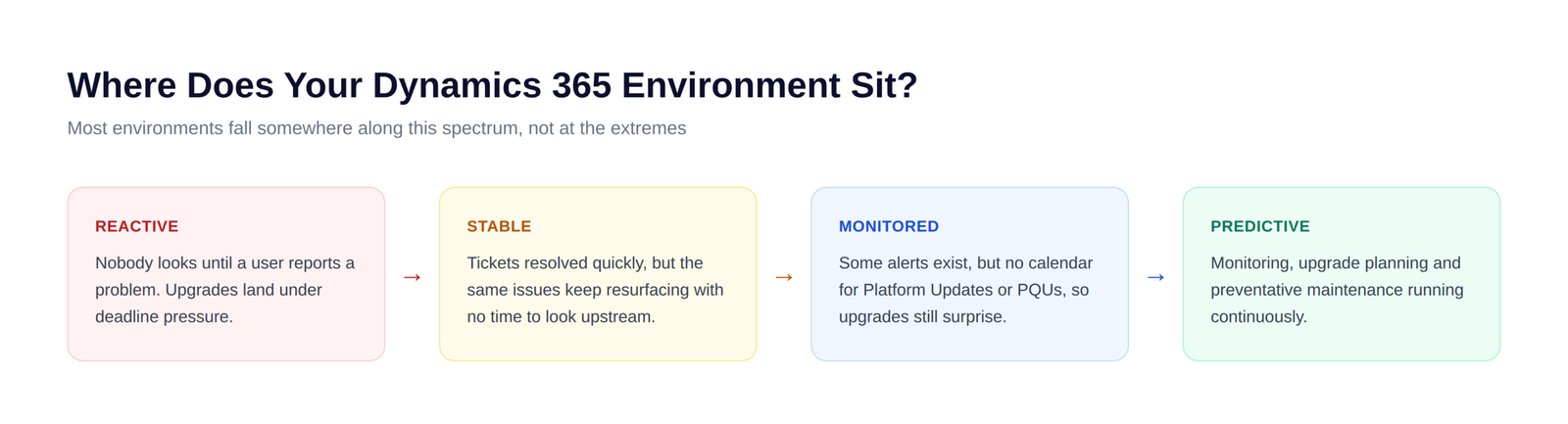
Four stages, roughly:
- 1. Reactive – nobody looks at the environment until a user reports a problem, and upgrades land under deadline pressure.
- 2. Stable – tickets are resolved quickly, but the same issues keep returning. The underlying causes aren’t always addressed.
- 3. Monitored – some alerting exists, but there’s no calendar for Platform Updates or Proactive Quality Updates, so upgrades still land as surprises.
- 4. Predictive – monitoring, upgrade planning and preventative maintenance run continuously, so problems get caught before a user notices.
Most businesses we talk to sit somewhere between stage two and three, not because they haven’t tried, but because reactive support and predictive maintenance require a fundamentally different structure, not just more effort inside the same one. Recognising which stage you’re actually in is usually the more useful starting point than any specific action item.
Where AI Agents Fit Into Predictive Maintenance
Reaching stage four at scale runs into a real constraint: Dynamics 365, Power Platform and the Microsoft ecosystem around them change constantly, and a person manually watching every Platform Update, Proactive Quality Update, release wave announcement and connector deprecation across Finance, Supply Chain and every customisation doesn’t scale past a handful of environments. This is the part of predictive maintenance we’re actively building AI agents to handle.
Our approach isn’t a single chatbot bolted onto support tickets. It’s a set of specialist AI agents, with each agent focused on a different part of the update lifecycle:
- Release monitoring – watches Microsoft’s release documentation for changes affecting your environment.
- Impact analysis – compares those changes against your code and customisations to work out what will genuinely break.
- Fix preparation – helps draft fixes and recommendations for the issues it finds.
- Regression testing – tests changes before they move forward.
- Deployment planning – helps plan a safe path from Dev to Sandbox to Production.
Two design decisions matter more than the technology itself, and they’re the ones worth knowing about if an AI agent is ever going to touch your environment:
- Every claim is cited, never assumed – when an agent flags a breaking change, it points to the specific Microsoft document or line of code behind it. No citation, no claim.
- Agents propose, humans decide – agents draft fixes and recommendations, but nothing deploys to production without a named person signing off. The agent identity is deliberately locked out of approval rights.
The goal isn’t to remove people from the process. It’s to remove the repetitive parts, watching for announcements, cross-referencing customisations, re-running the same regression suite, so your account team spends time on judgement calls, not tracking Microsoft’s release calendar.
This is still active development work for us, not a finished product, and we’d rather be upfront about that than oversell it. It’s the direction our monitoring and upgrade-planning work is heading, and why predictive maintenance keeps improving over time rather than staying capped by how many hours a support team has in a week.
Is Your Dynamics 365 Environment Truly Predictive?
Three quick questions to check where you actually stand:
✓ Are issues identified before users report them, or after? ✓ Are Platform Updates and Proactive Quality Updates tested and scheduled in advance, or applied under deadline pressure? ✓ Do you have monitoring and preventative maintenance running continuously, or only when something’s already gone wrong? |
If any of those answers gave you pause, that’s worth a conversation, not a rebuild. Nexevolve’s Dynamics 365 Services for Dynamics 365 Finance, Supplychain and Customer Service cover exactly this shift, from Predictive Maintenance through to full Managed Service coverage as your business grows. Talk to us about where your environment would start.