– By Nexevolve Team, Odoo Silver Partner, Australia
Odoo multi-country localisation, sometimes called Odoo multi localisation, lets one Odoo database follow each country’s tax rules, currency, language and legal entity. It comes down to five decisions. Get them right and a new country becomes a repeatable step. Get them wrong and you spend two quarters untangling tax codes, exchange differences and invoices in the wrong language.
Quick answer: Odoo runs each country as its own company, with its own tax package and one main currency, while customers and products can be shared across the group. Australian companies use GST and BAS tools, and New Zealand companies use a 15% GST return. |
This playbook is for multi-country groups already running Odoo ERP in Australia. Nexevolve is an Odoo Silver Partner in Australia, so the examples cover Australia and New Zealand. Each decision below gives the short answer, the mistake to avoid and a quick test.
Decision 1: How Many Companies Does Your Odoo Group Need?
Short answer: create one company per country. Use branches only for extra sites that file under the same tax return, such as several Australian sites under one ABN and one BAS.
Odoo treats a company as a legal entity and a branch as part of one. A branch shares its parent company’s chart of accounts and taxes, so it cannot run another country’s tax rules.
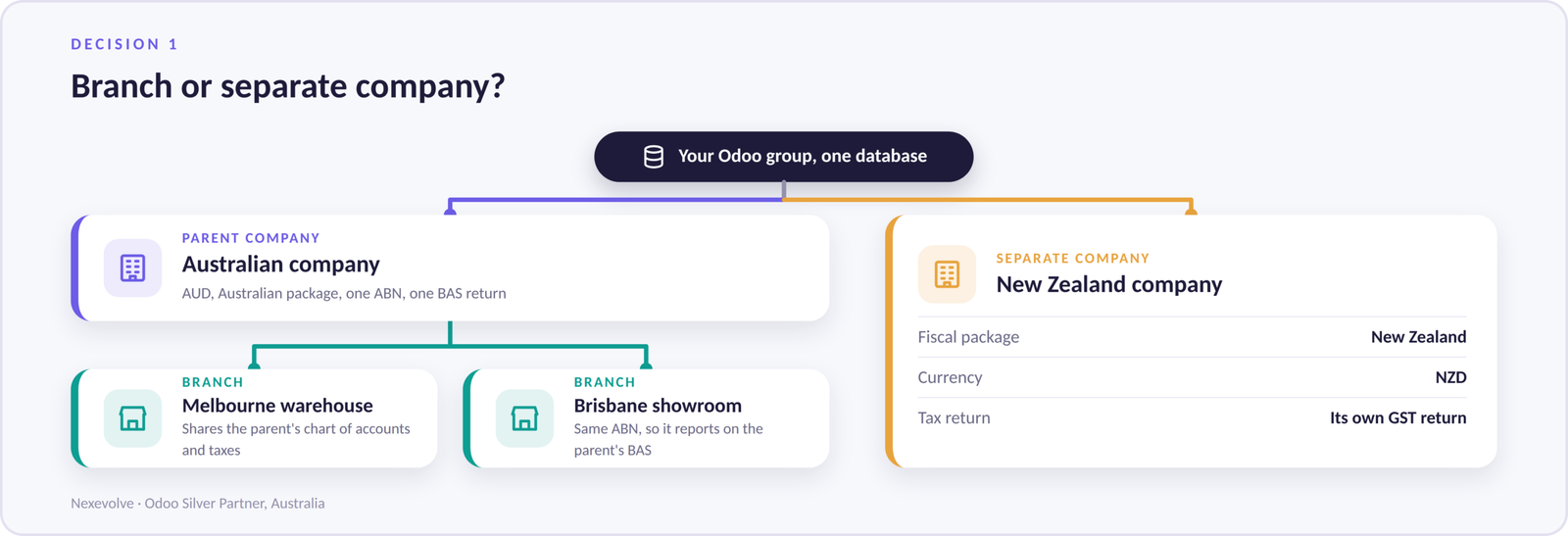
Common mistake: using a branch for a second country. It looks tidy on the org chart. But a branch shares the parent’s chart of accounts and taxes, so the New Zealand site ends up on Australian tax logic.
Quick test: for each site, ask whether it files its own tax return. If yes, it is a company. If no, it is a branch.
Inventory management follows the same structure, so settle your legal entities before you map warehouses.
Decision 2: Which Fiscal Localisation Package Does Each Company Get?
Short answer: install each company’s own fiscal localisation package when you create it, before any journal entry is posted. Australian companies get GST and BAS tools, and New Zealand companies get a GST return built for the IRD.
A fiscal localisation package is a country-specific bundle. It installs a chart of accounts, tax rates, fiscal positions and statutory reports for one company. Odoo applies it per company, not per database. The official Odoo fiscal localisation documentation lists every supported country.
Australia: GST, BAS, TPAR, Peppol and ABA Files
For ERP accounting software in Australia, the Australian package includes GST tax codes, BAS reporting, TPAR reporting for contractor payments, Peppol e-invoicing and ABA files for bulk bank payments. The Odoo Australia localisation page lists the full feature set.
New Zealand: GST Returns and EFT Batches
The New Zealand package uses a 15% GST rate. Its GST report sorts entries into the boxes of the IRD return, so you can review the data before you submit it. It also supports Peppol e-invoicing, EFT batch payments and an Employment Hero payroll sync. Odoo documents the details on its New Zealand localisation page. If your group is expanding across the Tasman, see our pages on ERP software in New Zealand and ERP implementation in New Zealand.
Here is how the two packages compare. Returns go to the Australian Taxation Office in Australia and to Inland Revenue in New Zealand.
| Item | Australia | New Zealand |
| Tax authority | Australian Taxation Office (ATO) | Inland Revenue (IRD) |
| Indirect tax | GST at 10% | GST at 15% |
| Main return | BAS | GST return, boxes 1 to 15 |
| Currency | AUD | NZD |
| Other features | TPAR, Peppol, ABA files | Peppol, EFT batches, Employment Hero payroll sync |
Common mistake: starting on a generic chart of accounts and planning to switch later. Odoo’s documentation notes you can only select another package until the first entry is posted.
Quick test: post a sample invoice in the first week, then check the tax lines and run the tax report.
Decision 3: How Will You Handle Multi-Currency and Exchange Rates?
Short answer: give each company one main currency, choose a rate source and name an owner. Odoo posts any gap between the invoice rate and the payment rate to the Exchange Difference journal.
Each company has one main currency, but it can trade in many. An Australian company keeps its books in AUD even when it invoices in USD or NZD. Odoo stores a rate for each currency and date and can fetch rates automatically on a schedule.
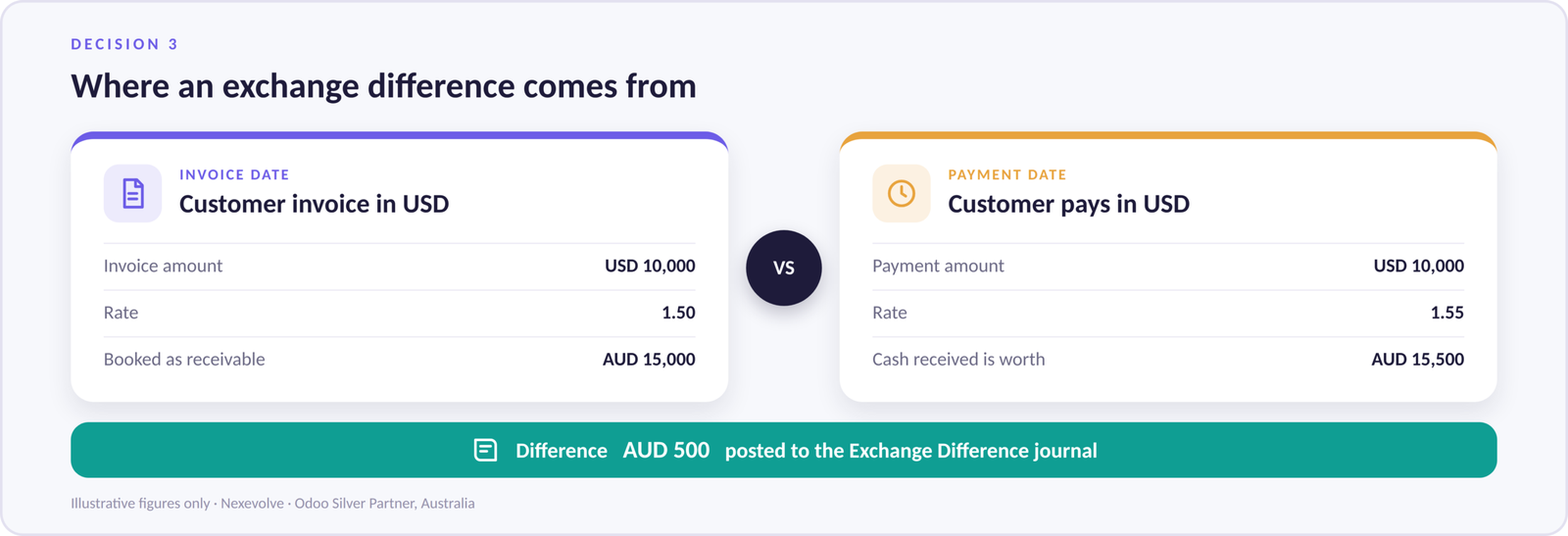
When the payment arrives at a different rate, the gap is posted to the Exchange Difference journal. That is normal behaviour, not an error.
Common mistake: leaving rates unmaintained or ignoring exchange difference postings.
Quick test: ask whether finance reviews exchange differences for each company every month.
Decision 4: What Stays Shared and What Stays Separate Across the Group?
Short answer: share customers and products where it helps, and keep accounts, taxes and journals separate for each company.
Customers and products are often shared across the group, while accounts, taxes, journals and bank accounts stay company-specific. The Odoo multi-company documentation covers how users switch between companies.
When one entity sells to another, both sides need a matching record. Odoo’s intercompany rules can create the counterpart purchase order or invoice in the other company. Consolidation then combines the entities and eliminates the intercompany balances, giving finance live group reporting instead of a month-end spreadsheet merge. Check which consolidation tools your Odoo edition includes before promising group reports.
Common mistake: sharing everything, then discovering one country’s settings changed another’s.
Quick test: confirm each country can close its month without waiting on the others.
Decision 5: Which Languages and Documents Will Customers See?
Short answer: install only the languages you need, then preview your invoice, quotation and delivery templates in each one.
Language is the quietest part of a multi-country Odoo rollout, and the one customers notice first. Each user picks an interface language, and each contact can have a preferred language. A quotation to an overseas buyer can then print in their language while your team keeps working in English. The Odoo language documentation explains how to add and manage languages.
Product names and descriptions need translating too, especially if Odoo ecommerce integration is on your roadmap.
Common mistake: translating the interface but never checking the customer documents.
Quick test: send yourself a test quotation in each customer language.
Benefits and Examples of Getting Odoo Multi-Country Localisation Right
Benefits
You get one source of truth, so a group report no longer depends on merging files. Each country’s returns come from the package built for it. For an Australian group with a New Zealand entity, BAS and NZ GST reporting then come from the same Odoo database.
Example Structures
These are illustrative setups based on common patterns, not specific client cases.
An Australian retailer opens a Melbourne warehouse and a Brisbane showroom. Both are branches of the existing company, so they share the chart of accounts and the BAS return and need no second package.
A manufacturer buys components through a USD-based trading entity. That entity is its own company, and the Australian company records purchases from it in USD.
How to Add a New Zealand Company to an Australian Odoo Database
Step 1: create the New Zealand company, set its country to New Zealand and its main currency to NZD.
Step 2: confirm the New Zealand fiscal localisation package is installed before you post any entry.
Step 3: check the 15% GST taxes and run the GST report on a test invoice.
Step 4: choose an exchange-rate source for AUD and NZD and name an owner.
Step 5: decide which customers and products are shared with the Australian company.
Step 6: set up intercompany rules, then test a full month-end close on a staging copy.
Conclusion: Plan Odoo Multi-Country Localisation Early
Here are the five decisions at a glance.
| Decision | Our default | Quick test |
| 1. Companies | One company per country | Does the site file its own return? |
| 2. Fiscal package | Install it when the company is created | Does a test invoice show the right tax? |
| 3. Currency | Name a rate owner per company | Are exchange differences reviewed monthly? |
| 4. Shared data | Share customers, separate the books | Can each country close without the others? |
| 5. Language | Preview templates in every language | Does a test quote print correctly? |
Decide structure first and each new country becomes a repeatable step. If you are weighing new modules too, our look at Odoo 20 pricing, AI features and module updates is a useful companion.
As an Odoo Silver Partner in Australia, we help groups plan and roll out these structures. Our Odoo implementation in Australia work follows the same decision order.
Planning to expand Odoo into another country? Speak with a Nexevolve Odoo expert to review your company structure, localisation, currencies and intercompany setup before you configure anything. Based in Sydney? See our Odoo partner in Sydney page.