
By the Nexevolve team, Microsoft Dynamics 365 Partner, Australia
If your team is still testing every Dynamics 365 F&O update by clicking through screens from memory, you’re not alone, and it likely carries more risk than it appears to day-to-day. Dynamics 365 F&O testing automation replaces that manual click-through with recorded, repeatable test suites that run automatically every time Microsoft ships a new release to your enterprise resource planning (ERP) system, turning update validation into a repeatable process instead of a recurring manual exercise.
This guide covers why manual testing breaks down, the four maturity stages, what the tooling looks like in practice, and common mistakes to avoid.
What Is Dynamics 365 F&O Testing Automation?
Dynamics 365 F&O testing automation means using tools like Microsoft’s RSAT to turn manual checking of D365 Finance and Operations updates into repeatable, automated test suites. Instead of someone clicking through processes by hand, a recorded suite runs those same checks and reports results without anyone needing to trigger it.
Why Manual Testing Breaks Down Under Microsoft’s Update Cadence
Microsoft ships Dynamics 365 F&O updates several times a year under its One Version programme, and each one can touch customisations, integrations or processes across the Finance and Supply Chain Management modules alike. A manual test pass that takes days to run properly rarely gets that time in practice, so teams shorten it, delegate it to whoever is free or skip it for “low risk” updates that turn out not to be so low risk.
The result shows up downstream: a broken sales order workflow, a finance close that doesn’t reconcile, a process that stops working, because release cycles outpaced testing.
The Four Stages of D365 F&O Testing Automation Maturity
Most organisations don’t jump straight to full automation. They move through recognisable stages, often without realising which one they’re on. Knowing where you sit tells you what the next step actually is.
| Stage 0 Manual & Ad Hoc | Someone on the finance or ops team clicks through the same screens from memory before every update, hoping they remember every edge case. There’s no record of what was actually tested, so gaps only surface once a real transaction fails in production. |
| Stage 1 Recorded Task Scripts | Task Recorder captures key workflows as reusable scripts, which is a genuine step forward, but the scripts usually live on one person’s machine and quietly go stale the first time a process changes. |
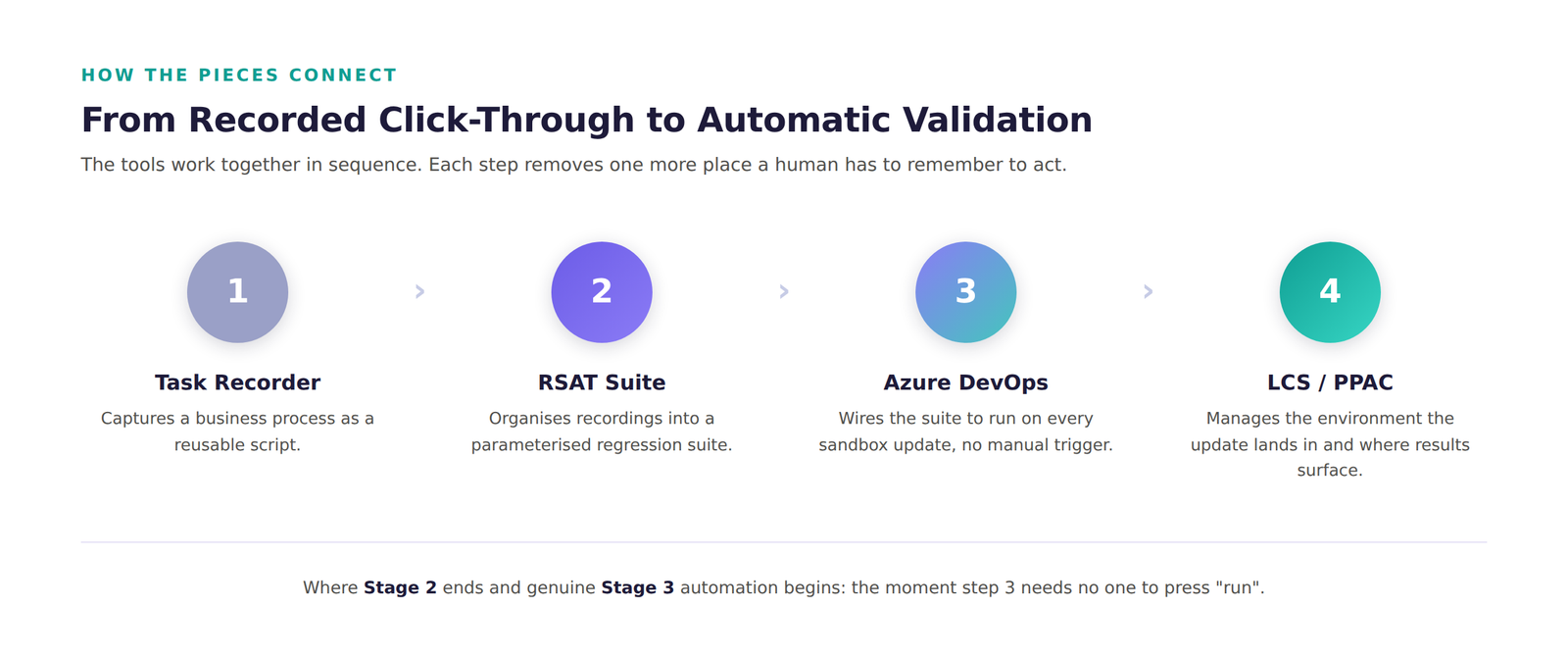
| Stage 2 RSAT Regression Suites | Recorded tasks become a structured regression suite inside the Regression Suite Automation Tool (RSAT), organised against real business process libraries and parameterised with test data, so the same suite runs consistently every time. |
| Stage 3 CI/CD-Integrated Pipelines | The RSAT suite is wired into Azure DevOps and Lifecycle Services, so it runs automatically against every sandbox update. Nobody has to remember to trigger it, and failures surface days before go-live, not after. |
How Does Automated Testing Work in D365 F&O?
At the centre of most Stage 2 and Stage 3 setups sits the Regression Suite Automation Tool (RSAT), Microsoft’s tool for turning recorded processes into repeatable test suites. It builds on Task Recorder captures and runs against different data sets without re-recording anything.
The other half of the picture is orchestration. RSAT alone still needs someone to press “run”. Wiring it into Azure DevOps and Lifecycle Services (LCS) means the suite triggers automatically the moment a sandbox environment receives an update.
Worth planning for: Microsoft has been moving environment management off LCS onto the Power Platform Admin Center (PPAC), the default for new projects since February 2026.
What Australian D365 F&O Environments Need to Test For
RSAT and DevOps orchestration work the same everywhere. What changes locally is which processes belong in the suite, and a handful of things are specific to Australian operations Microsoft’s own testing won’t cover.
- GST and BAS reporting: tax field mappings can look fine in a demo yet break in a live BAS.
- Single Touch Payroll (STP) integrations: payroll reporting to the ATO deserves its own dedicated test case.
- Multi-state operations: cross-state operations often carry workflows a generic script won’t exercise on its own.
- Customisations built for your business: anything built for your business needs its own place in the suite; base testing won’t cover it.
It doesn’t change how RSAT or DevOps work, just what belongs in the suite you build with them.
Read our Latest Blog – ERP Software Australia Guide
What Are the Benefits of Automating D365 F&O Testing?
The case for Dynamics 365 business process automation isn’t just about saving hours on testing. It’s about how the business relates to updates:
- Fewer surprises on update day: regressions surface in the sandbox during the validation window, not in production after go-live.
- Consistent coverage every cycle: the suite tests the same critical processes every time, regardless of who’s available that week.
- Faster sign-off: a same-day automated run replaces a testing cycle that used to take days of manual effort.
What Executives Ask Before Investing in Testing Automation
These come up once the case reaches a CFO or COO, not just IT:
Is D365 F&O testing automation worth it for a mid-size business?
Usually, yes. A bad update typically costs far more in downtime and emergency fixes than a focused RSAT suite costs to build, and industry research puts a few hours of IT downtime well into six figures for a mid-size operation.
What’s the business case for automating D365 F&O testing?
It comes down to three numbers: hours manual testing consumes each release, how often an untested change causes a production issue, and what one bad update costs the business. Automation turns that recurring cost into a one-time build.
What’s the risk of skipping automated regression testing?
Rarely one dramatic failure. It’s small breakages that add up: a tax calculation a few cents out, a workflow that stops notifying someone, a shifted integration field. Left uncaught, these cost more to fix in production than in a sandbox.
Not sure which of the four stages you’re on? Get a quick Analysis on it →
A Familiar Scenario
This composite reflects a pattern we see often across F&O environments, not a specific, named client.
A mid-sized Australian distributor used to spend most of a week manually testing each F&O update. After building an RSAT suite and wiring it into Azure DevOps, validation now runs in hours instead of days.
Common Mistakes When Automating D365 F&O Testing
New to this? Watch for these:
- Automating the wrong processes first: scripting what’s easiest, not what’s business-critical.
- Skipping the orchestration step: a good RSAT suite still needs someone to trigger it unless it’s wired into DevOps.
- Hardcoded test data: a script tied to one customer ID or inventory level breaks the moment that record doesn’t exist. Parameterise data through RSAT’s Excel parameter files instead.
How Do You Start Automating D365 F&O Testing?
A realistic rollout runs in three phases:
- Phase 1: Map and prioritise. Identify which processes would hurt most, usually order-to-cash or procure-to-pay.
- Phase 2: Record and build. Build the RSAT suite against that priority list, parameterised against realistic data.
- Phase 3: Connect and expand. Wire the suite into Azure DevOps and LCS so it runs on every sandbox update, then expand into secondary processes.
This approach holds regardless of platform: start narrow, then widen it.
Final Thoughts
Manual regression testing was never going to scale against a cloud ERP that updates itself several times a year. The goal isn’t a bigger testing team, it’s a repeatable RSAT suite tied to a workflow that makes testing part of every update cycle.
If you’re weighing up where to start, see also our take on Copilot ROI for Dynamics 365 and predictive maintenance versus reactive support.
Why Nexevolve for D365 F&O Testing
A few reasons teams bring us in for this specifically:
- Dual-accredited: Nexevolve is a Microsoft Dynamics 365 Partner and Odoo Silver Partner based in Australia, offering Dynamics 365 ERP implementation, integration and consulting services beyond testing, so we’re already fluent in F&O rather than learning it on your project.
- Hands-on delivery: we’ve built RSAT suites and wired them into Azure DevOps and Lifecycle Services for manufacturing, distribution and finance operations.
- Maintained, not abandoned: a suite we help build gets maintained as D365 updates change, not shipped once and left to go stale.
SEE WHERE YOU STAND Nexevolve can assess your testing process and map a path to automated, DevOps-integrated testing, no generic sales pitch. |