
By Nagendra Varma, Nexevolve – Odoo Silver Partner, Australia
We covered Odoo 20’s broad goals in our earlier Odoo 20 overview. This guide is the practical follow-up, updated now that Odoo 20 has been unveiled at Odoo Experience 2026 in Brussels (24–26 September). It covers Odoo 20 pricing, the new Odoo 20 AI features and the Odoo 20 module updates that matter most for Australian businesses right now: what it will cost, what the new AI tools actually do day to day, and what to test before touching a live system.
We answer all three below, in plain terms, using what’s been confirmed since the Brussels keynote alongside pre-launch previews, rather than launch-day marketing alone. Some detail is still pending Odoo’s official release notes, so we’ve flagged anywhere it could shift before general availability.
Key Takeaways
- Release: unveiled at Odoo Experience 2026 in Brussels on 24–26 September 2026; general availability expected around October 2026.
- Pricing: Standard is unchanged; Custom is up 20% to A$64.00–A$80.00 per user/month; a new Light Users tier has been added.
- New Odoo 20 features: natural language search, an AI accounting agent, Helpdesk AI, Timesheet AI and a native MCP server, alongside rework in Payroll, POS, Field Service, Accounting and Mobile.
- Not yet final: exact AI feature specs and Light Users pricing are still based on pre-launch previews, not confirmed release notes.
Odoo 20: What’s Done, Confirmed or Still a Preview
Not everything below carries the same certainty. The Brussels event is simply done, it already happened, and pricing is now officially confirmed, but the AI tools and module changes are still based on pre-launch demos rather than final release notes. Here’s which is which, so you know what to plan around and what to treat as directional.
| Area | Status | What We Know |
| Release event | Done | Unveiled 24–26 September 2026 at Odoo Experience 2026 in Brussels. It has already happened. |
| General availability | Preview | Expected around October 2026; exact date not yet confirmed. |
| Standard plan pricing | Confirmed | Unchanged: ~A$34.40 per user/month promo, A$43 renewal. |
| Custom plan pricing | Confirmed | Up 20%: A$64.00 per user/month promo, A$80.00 renewal. |
| Light Users tier | Confirmed | New tier exists; exact AU pricing not yet published. |
| AI features | Preview | Search, accounting agent, helpdesk, timesheets and MCP server, based on pre-launch demos. |
| Module changes | Preview | Expected across Payroll, POS, Field Service, Accounting and Mobile. |
Odoo 20 Pricing: What It Actually Costs in Australia
The Standard plan is unchanged from Odoo 19, and the only real pricing update is a 20% increase on Custom, alongside a new Light Users tier sitting below both. See Odoo’s pricing page for the full breakdown.
| Plan | Year 1 (promo) | Year 2+ | Best For |
| Standard | ~A$34.40/user/mo | ~A$43/user/mo | Most day-to-day teams |
| Custom (+20%) | A$64.00/user/mo | A$80.00/user/mo | Teams wanting the new AI tools |
| Light Users (new) | Not yet published | Not yet published | Warehouse, cleaning, POS or casual staff |
| One-app free | Free | Free | Testing a single application only |
Light Users sits alongside Standard and Custom rather than replacing either; exact per-user pricing wasn’t confirmed, and we’ll update this once Odoo publishes it for Australia. One-app free is unlimited users, but limited to a single application.
If you’re wondering why now, it’s Odoo’s first price increase in four years, and Odoo says it’s reinvested straight back into the platform rather than kept as margin (more on that in the FAQ below). Worth budgeting for either way: Odoo’s AI features have historically needed the Custom plan or separate in-app purchase credits and Odoo 20 keeps that pattern.
For Finance & Accounting Teams
Two of Odoo 20’s most useful changes land squarely in finance.
AI-Assisted Reconciliation
The AI accounting agent runs anomaly checks and bank reconciliation reviews automatically, flagging unusual transactions and summarising what it finds so your team reviews a shortlist instead of every line. It pairs with direct bank payment initiation and easier reconciliation on any general ledger account, not just the ones Odoo currently supports by default.
Payroll
Simpler work-entry handling. A new dashboard flags missing bank details or expired contracts before they cause a payroll run to fail.
Natural Language Database Search
Describe what you need in plain language, for example “unpaid invoices from Melbourne clients over 90 days”, and Odoo surfaces the matching records. Timesheet AI works the same way for time entries, suggesting them from tracked activity instead of relying on memory at the end of the week. Worth reading alongside our guide to AI already available in Odoo today, since some of this is usable before Odoo 20 lands.
The payoff: a Melbourne manufacturer reconciling several supplier accounts could close its books days sooner, catching anomalies before the accountant does instead of after.
If your finance team is still spending real hours on manual reconciliation each month, it’s worth a quick conversation before Odoo 20 lands. Talk to us about your Odoo setup, no obligation, just a look at what would actually change for your workflows.
For Sales, Service & Retail Teams
Two changes here are worth knowing about before your next busy period, whether you’re running a physical store, an online storefront, or both at once.
Helpdesk AI
Drafts replies based on how similar tickets were resolved before, and surfaces the closest past cases. Agents stop starting from scratch on repeat issues.
Point of Sale
Browser-based hardware support means receipt printers, scanners and cash drawers connect without a dedicated IoT box.
The payoff: a wholesale distributor opening a new showroom could set up a POS terminal in an afternoon instead of waiting on an IoT box, and support agents stop re-answering the same ticket from scratch. See our Odoo vs SAP vs Oracle comparison if you’re still weighing up platforms before you get this far.
For Operations, Field & IT Teams
The remaining changes matter most once Odoo 20 is already running your day-to-day operations and inventory.
Field Service and Planning
These two separate modules merge into one scheduling engine, combining resource assignment and material planning into a single view.
Mobile
A full interface redesign built for touch. A long-standing weak point compared to Odoo’s desktop experience.
Native MCP Server
The one IT teams should watch most closely. Odoo 20 is expected to ship a native MCP (Model Context Protocol) server, so external AI assistants like Microsoft Copilot or Claude can connect directly to Odoo data. No custom-built integration required. A few new industry templates are also expected, including Construction and Auto Repair.
The payoff: a field service or construction business juggling technician schedules and material availability could plan both from one screen instead of cross-checking two modules every morning, and a touch-first mobile redesign makes staff more likely to actually use the app on-site. If inventory and warehouse workflows are the bigger pain point day to day, our Odoo supply chain and inventory guide goes deeper on that side.
For a closer look at all of this in action, see Odoo’s own walkthrough of Odoo 20’s best features and the full Odoo 20 documentationtion for every application.
Nexevolve’s Odoo 20 Upgrade Checklist
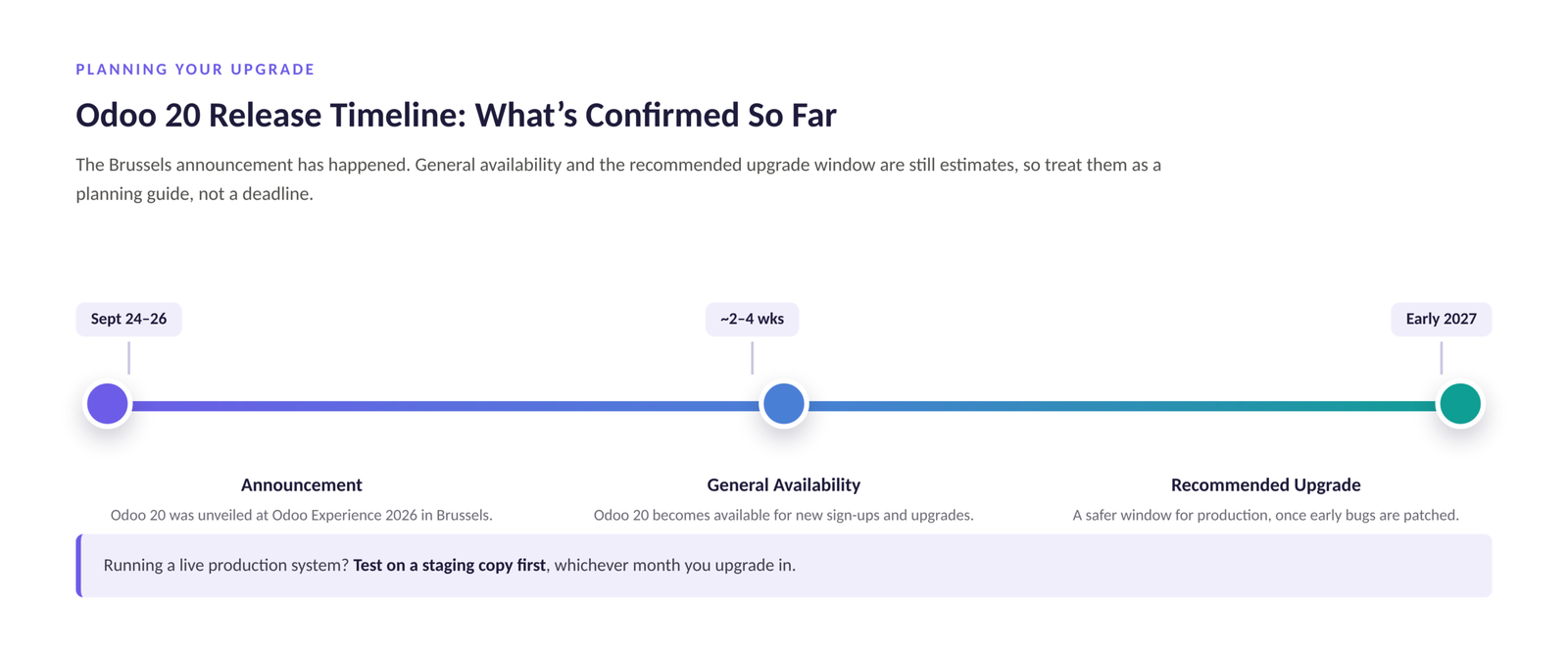
This is the same sequence we run as part of our Odoo implementation service for our own Odoo 20 upgrade clients. It matters more for Odoo 20 than most releases, since a lot of what’s changing touches AI-driven automation working directly with your financial and operational data.
- Clone your environment: copy your current Odoo database to a staging environment first. Never upgrade a live production system directly.
- Apply the upgrade to staging: run the Odoo 20 upgrade there once general availability lands, not on the day it’s announced.
- Test what your team actually uses: check the workflows your business depends on day to day, not just the items listed in Odoo’s release notes.
- Hold off on production: wait until early 2027 if you can, once the first round of post-launch bug fixes has landed.
- Get a second opinion: talk to Nexevolve for an upgrade readiness assessment against your specific setup, not a generic checklist.
Our Odoo implementation timeline guide covers what a realistic rollout looks like week by week. Ready to start? Book a free consultation and we’ll assess your specific Odoo setup directly.