You buy 100 units at $10, then 50 more at $13, and sell 80. What did those 80 units cost you: $800 or $880? Odoo software can give you either answer, and the setting that decides it is your costing method.
Getting Odoo inventory valuation right means choosing that method on purpose, so your stock value, cost of goods sold (COGS) and gross margin tell the same story. This guide covers Odoo 19 and Odoo 20, compares FIFO and AVCO on a real sale, and helps you pick the right method when you run Odoo ERP in Australia.
FIFO (First In, First Out) costs a sale at your oldest purchase price. AVCO (Average Cost) uses one running average. Standard Price uses a cost you set by hand. Odoo does not offer LIFO as a costing method, and Australian accounting standards do not allow it.
How Does Odoo Inventory Valuation Work?
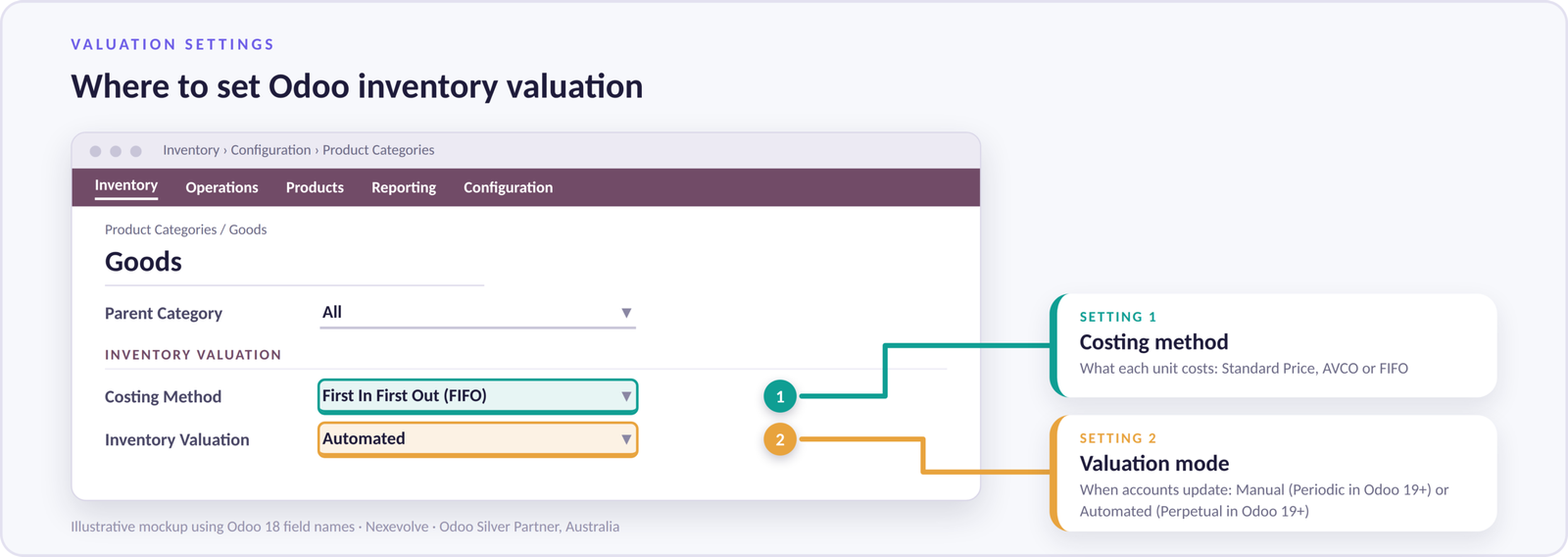
Odoo values stock using two settings on each product category, then links stock movements to your accounting records.
Every stock movement affects inventory valuation. With automated valuation, Odoo connects stock movements to your accounting records, helping keep inventory values and financial reporting aligned. The timing of accounting entries depends on your configuration.
Setting 1: Costing method (what each unit costs)
This sits on the product category (Inventory, Configuration, Product Categories) and decides which unit cost Odoo uses when stock leaves: Standard Price, Average Cost (AVCO) or FIFO.
Setting 2: Inventory valuation mode (how stock links to your accounts)
Manual (Periodic in Odoo 19 and later) means someone posts accounting entries for stock at period end. Automated (Perpetual in Odoo 19 and later) connects stock movements to your accounting records. See Odoo’s automatic inventory valuation documentation.
Odoo 19 and Odoo 20: Check Your Version
Valuation terms and accounts differ between versions. Odoo 18 uses Manual and Automated; Odoo 19 uses Periodic and Perpetual, with a Stock Variation account in place of separate Stock Input and Stock Output accounts. Confirm the exact names, accounts and posting timing for your version in the valuation cheat sheet in Odoo’s 20.0 documentation before you configure or upgrade.
Odoo Costing Methods: What Are FIFO, AVCO and LIFO?
FIFO and AVCO follow your real purchase prices, Standard Price fixes the cost by hand, and LIFO is not a costing option in Odoo.
FIFO in Odoo
FIFO treats each receipt as its own cost layer. On delivery, Odoo takes the cost from the oldest layer first and sends it to COGS. When prices rise, cheaper old costs reach COGS first, so gross profit looks higher and closing stock sits near current prices.
AVCO in Odoo
AVCO keeps one running cost per product and recalculates it whenever stock arrives:
New unit cost = (value of stock on hand + value of the new receipt) / (quantity on hand + quantity received)
Landed costs such as freight and duties join the receipt value, so they end up inside the average. Margins move gently, but after a sharp price rise the average lags the market.
Why LIFO is not an option
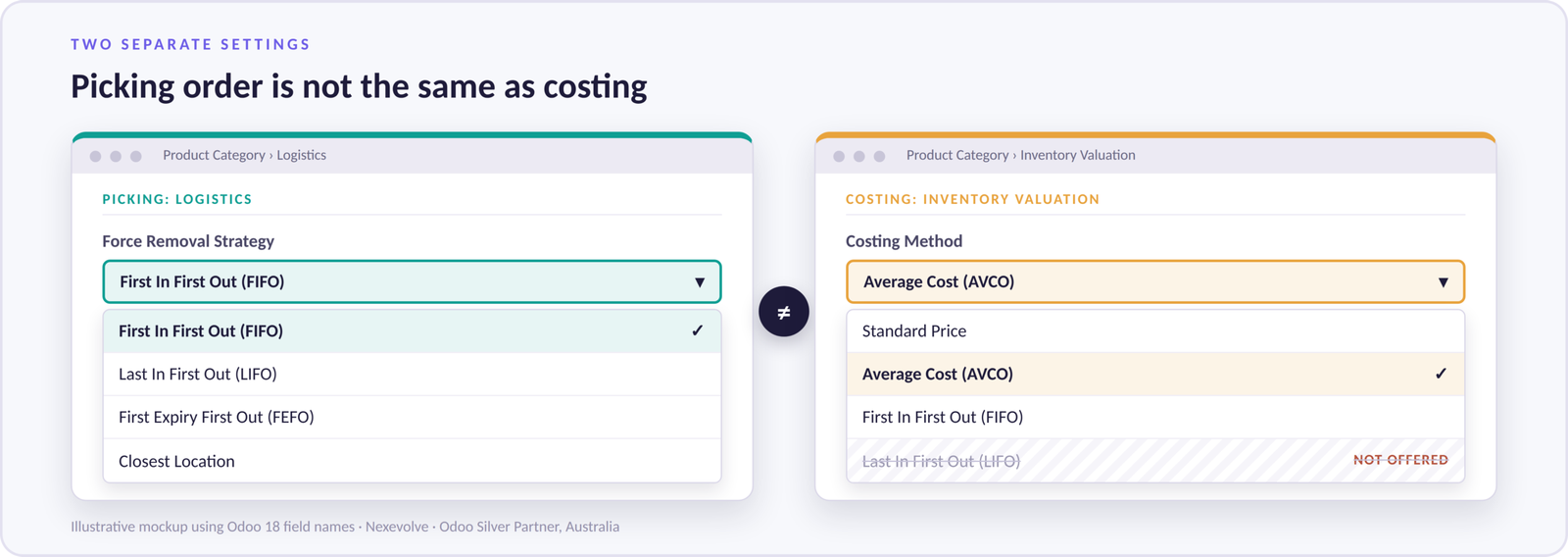
LIFO (Last In, First Out) is not an Odoo costing method, and IAS 2 and its Australian equivalent, AASB 102, do not allow it, because it can leave your balance sheet holding stock at very old prices.
The confusion comes from Odoo listing LIFO as a removal strategy, which only decides which physical stock the warehouse picks first, not which cost reaches COGS. Treat picking and costing as separate decisions, and ask your accountant before using any LIFO picking rule. For expiry-dated goods, pick with FEFO (First Expired, First Out) and cost with FIFO or AVCO.
FIFO vs AVCO: One Sale Costed Both Ways
On the same 150-unit sale, FIFO books COGS of $1,200 and AVCO books $1,275, a $75 difference in gross profit.
- Receipt 1: 200 units at $8.00 each (total $1,600).
- Receipt 2: 100 units at $9.50 each (total $950).
- Delivery: you validate a sale of 150 units.
| FIFO | AVCO | |
|---|---|---|
| Stock before the sale | 200 units at $8.00 plus 100 units at $9.50 = $2,550 | 300 units at $8.50 = $2,550 |
| COGS for the 150 units | 150 x $8.00 = $1,200 | 150 x $8.50 = $1,275 |
| Closing stock | 50 units at $8.00 plus 100 units at $9.50 = $1,350 | 150 units at $8.50 = $1,275 |
| Gross profit effect | $75 higher than AVCO | $75 lower than FIFO |
What happens when freight is added
Suppose Receipt 2 also carries $150 of freight through a landed cost. It is now worth $1,100, or $11.00 a unit.
- FIFO: the freight stays with that layer. The sale still takes 150 units at $8.00, so COGS stays at $1,200 and closing stock rises to $1,500.
- AVCO: the freight is spread across everything. The average becomes $2,700 / 300 = $9.00, so COGS is $1,350 and closing stock is $1,350.
Before you use landed costs: switch them on in Inventory settings and check how your product category’s costing and valuation settings affect them. Follow the steps in Odoo’s landed costs documentation for your version, and test on a copy of your database first.
Landed costs show the real difference between the methods: FIFO keeps freight with its batch, while AVCO spreads it across all stock. Which one fits depends on how you buy and sell, so here is how to choose.
Read our Latest Blog – Odoo Multicountry Localisation
How to Choose the Right Odoo Costing Method
Ask two questions: do your supplier prices move often, and does your auditor want the cost behind each sale? A yes to either points to FIFO. If both answers are no, AVCO is usually simpler, especially for high-volume goods with small price steps. Lot tracking and FEFO picking are separate from the costing formula, so batches alone should not decide it.
| Your situation | Lean towards | Why |
|---|---|---|
| Supplier prices change often | FIFO | Each sale follows a real purchase price |
| Batches, lots or expiry dates | FIFO or AVCO | Lot tracking and picking rules are separate from costing, so decide on price behaviour |
| Auditors or lenders want the cost behind each sale | FIFO | Cost layers give a clearer trail |
| Large volumes, small price steps | AVCO | Simple maths and steady margins |
| Imported stock with freight and duties | Either, with landed costs | Plan how costs are split before go-live |
The setting lives on the product category, so you can mix methods: fast-moving lines can use AVCO while imported lines use FIFO. Wholesale, retail and multi-location businesses often run both. Nexevolve sets this up for Odoo Australia clients through our Odoo inventory management solution, from Odoo ERP for retail and Odoo eCommerce stores to ERP software for wholesale distribution.
What Automated Valuation Gives Your Finance Team
- Stock value you can trust all month: stock movements are linked to your accounting records, and an ERP solution with real-time reporting shows current stock value on demand.
- Fewer inventory errors: linked records mean fewer manual journals and fewer stock count mismatches to chase at month-end.
Five Costly Mistakes When Setting Up Odoo Inventory Valuation
Once you have chosen a method, most problems come from setup rather than the method itself.
- Loading opening stock at the wrong cost. FIFO builds its layers from this data, so errors flow into early COGS. Reconcile legacy stock values to the ledger before import.
- Mixing up picking and costing. A LIFO or FEFO removal strategy does not change your costing method. Set and test them separately.
- Changing the costing method after stock is on hand. It can change how that stock is valued. Change it at period end with your accountant, and test on a copy first.
- Skipping the account mapping. Map the stock accounts to your chart of accounts before the first receipt is validated, and check the account names for your Odoo version.
- Leaving landed costs for later. Decide how freight, duties and handling are split (by quantity, value, weight or volume) before go-live.
A short review of your product categories and supplier price history settles most of these before configuration starts. That review is where Nexevolve begins every inventory valuation project, as part of our Odoo ERP implementation services. Manufacturers should plan valuation together with Odoo ERP for manufacturing and ERP for inventory and production, because it feeds finished goods cost in ERP software for manufacturers projects.
Conclusion
Odoo inventory valuation comes down to two choices on each product category: how unit cost is calculated, and how stock movements link to your accounts. FIFO suits changing prices, AVCO suits high-volume goods, and LIFO is not allowed under IFRS or Australian standards. Opening stock, account mapping and landed costs are where most setups go wrong, so settle them first.
If you would like a second pair of eyes on your current Odoo inventory valuation setup, Nexevolve, an Odoo Silver Partner in Australia, can review your product categories, costing methods and account mapping with you. If you want to see it working first, you can book an Odoo ERP demo or explore our wider Odoo ERP services.