
Twenty users on Odoo cost about A$10,000 a year in licences. The implementation that gets them started can cost several times that in year one. Both numbers matter when you decide whether Odoo is worth it.
Is Odoo ERP worth it? For most Australian businesses that run stock, sales and finance across spreadsheets and separate tools, usually yes, but only if you budget for the whole project and not just the licence. This guide shows what you pay in 2026, walks through a five-year cost for a 20-user business, and helps you decide before you talk to a partner.
A few plain definitions first. Licence cost is the monthly fee per user. Implementation is the one-off work to set Odoo up for your business. Total cost of ownership is everything you pay over several years.
Is Odoo ERP Worth It for Your Business?
Odoo is usually worth it when manual work between your systems costs you more each year than Odoo costs to run, and it is not worth it when your business is only accounting and payroll.
Odoo puts sales, stock, accounting and more on one database, so an order is entered once and flows through to delivery and invoice. If your team re-types orders, checks stock in a spreadsheet or waits for month-end to see the numbers, you are already paying for the gaps, in staff time spent re-entering data, reconciling spreadsheets and chasing information across disconnected tools. Our Odoo ERP page explain how this works as cloud ERP software in Australia that businesses can grow into, and as an Odoo partner in Australia, we can show it working on your own workflows.
A simple test: write down the hours each week your team spends moving data between systems. Put a dollar value on them. That number is what Odoo has to beat.
Odoo Pricing in Australia: What Does Each User Cost in 2026?
Odoo licences cost about A$34 to A$80 per user per month in Australia, depending on the plan and whether it is your first year.
Plan | Year 1 (promo) | Year 2 onwards | Best for |
|---|---|---|---|
Standard | About A$34.40 per user per month | About A$43 per user per month | Most day-to-day teams |
Custom | A$64.00 per user per month | A$80.00 per user per month | Teams that need the extra features, including some AI tools |
One-app free | Free | Free | Testing a single application |
These figures come from our Odoo 20 pricing guide, written in September 2026. Check Odoo’s own pricing page before you finalise a budget, because prices and promotions change, and confirm whether a quote includes GST. Access to Odoo’s AI features can depend on the plan or on separate credits, so check which features you need before choosing a plan. A new Light Users option for warehouse, POS or casual staff has no published price yet.
What Do You Pay for Beyond the Licence?
Odoo implementation cost is usually the biggest line in year one, and it depends on your requirements and needs, so there is no standard price.
What shapes the cost | Usually lower | Usually higher |
|---|---|---|
Entities and locations | Single entity, one location | Several locations or multiple entities |
Customisation | Mostly standard features | Custom workflows and approvals |
Data and integrations | Small, clean data, few integrations | Large or messy data, POS, online store, payments |
Implementation covers set-up, data migration and training on top of the licence. Most mid-market ERP implementations with Nexevolve run 8 to 16 weeks from initial assessment to go-live, and larger or more complex projects take longer. Treat any quote that shows only a monthly per-user fee as incomplete until you have a full project figure in writing. Our Odoo ERP implementation services page explains how a project runs from discovery to go-live.
Here is where the rest of the money goes:
Cost line | What it covers | How to plan for it |
|---|---|---|
Implementation | Setting Odoo up around your workflows | Ask for a fixed scope in writing |
Data migration | Accounts, contacts, open invoices and stock | Budget for two trial runs and a reconciliation |
Customisation | Custom fields, workflows and approvals | Start with standard features, customise real gaps only |
Training | Sessions for every role | Include warehouse, sales and finance |
Support and upgrades | Help after launch and upgrades such as Odoo 20 | Agree before go-live and test upgrades on a staging copy |
Your team’s time | Project owner, finance sign-off, testing | Plan weeks, not hours |
If you sell online, look at the Odoo eCommerce integration early, because it affects stock, accounting and fulfilment together.
Five-Year Odoo ERP Cost Example: 20 Users on the Standard Plan
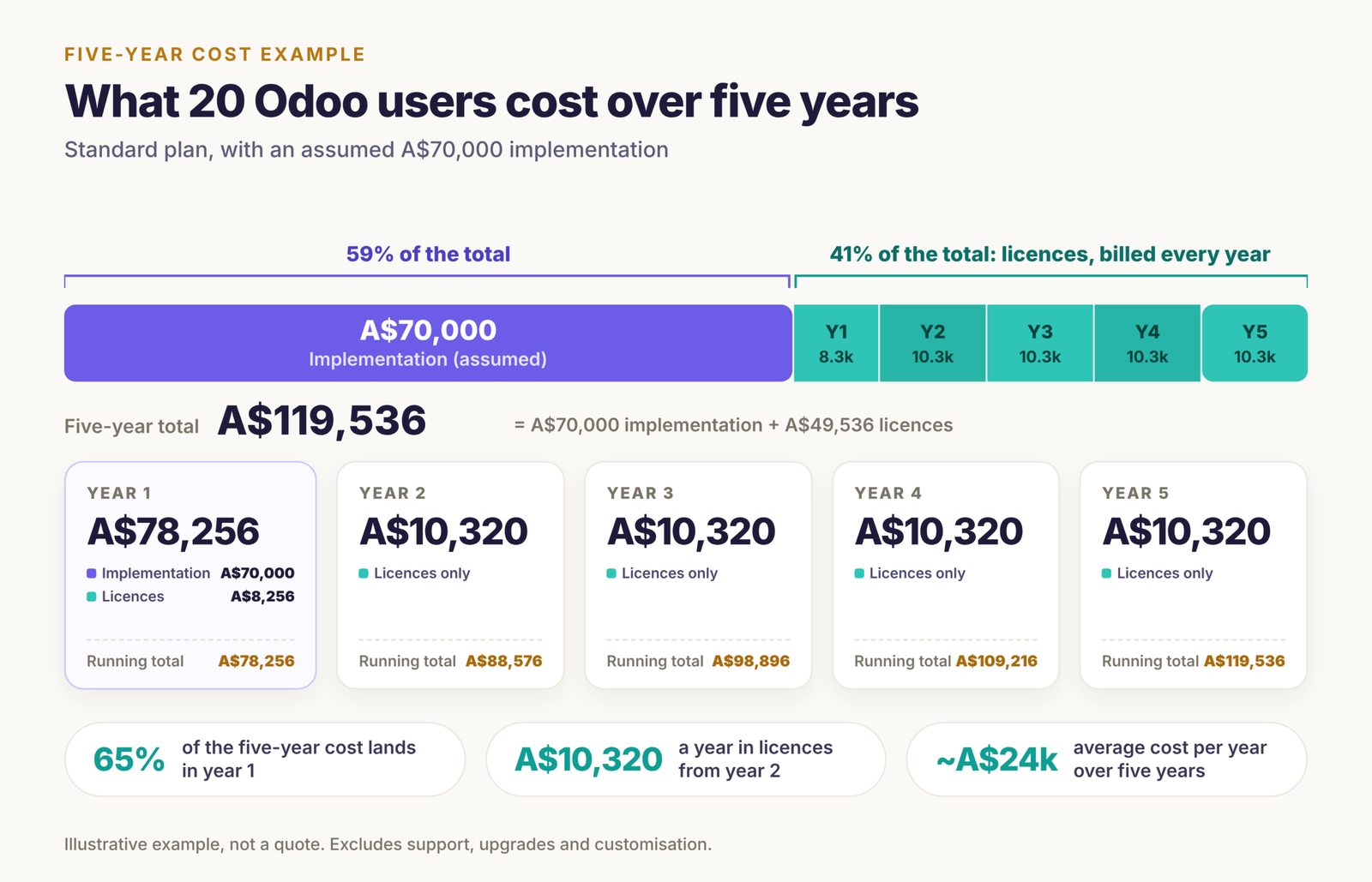
A 20-user business on the Standard plan, with an assumed A$70,000 implementation, spends about A$119,500 over five years, or roughly A$24,000 a year. This is an illustrative example, not a quote, so replace the implementation figure with one based on your own requirements.
Year | Licences (20 users) | Implementation | Total |
|---|---|---|---|
1 | A$8,256 | A$70,000 | A$78,256 |
2 | A$10,320 | none | A$10,320 |
3 | A$10,320 | none | A$10,320 |
4 | A$10,320 | none | A$10,320 |
5 | A$10,320 | none | A$10,320 |
Five-year total | A$49,536 | A$70,000 | A$119,536 |
This leaves out support, upgrades and customisation, which depend on your partner agreement.
What changes on the Custom plan
For the same 20 users, Custom costs A$19,200 a year at renewal against A$10,320 on Standard. That is A$8,880 more every year, so only choose it if your team will really use the extra features.
Now the other side: what you might save
Suppose connected systems save 25 hours a week of re-keying and reconciling, at a loaded cost of A$45 an hour. That is A$58,500 a year. Both numbers are planning assumptions, not benchmarks, so replace them with your own. Time recovered is not always cash saved, so count only the benefits that turn into real money, such as less overtime, avoided hires or fewer errors. If the savings only start at go-live, say three months in, break-even against the A$78,256 first-year cost still lands in the second year.
How to Decide if Odoo ERP Is Worth It for Your Business
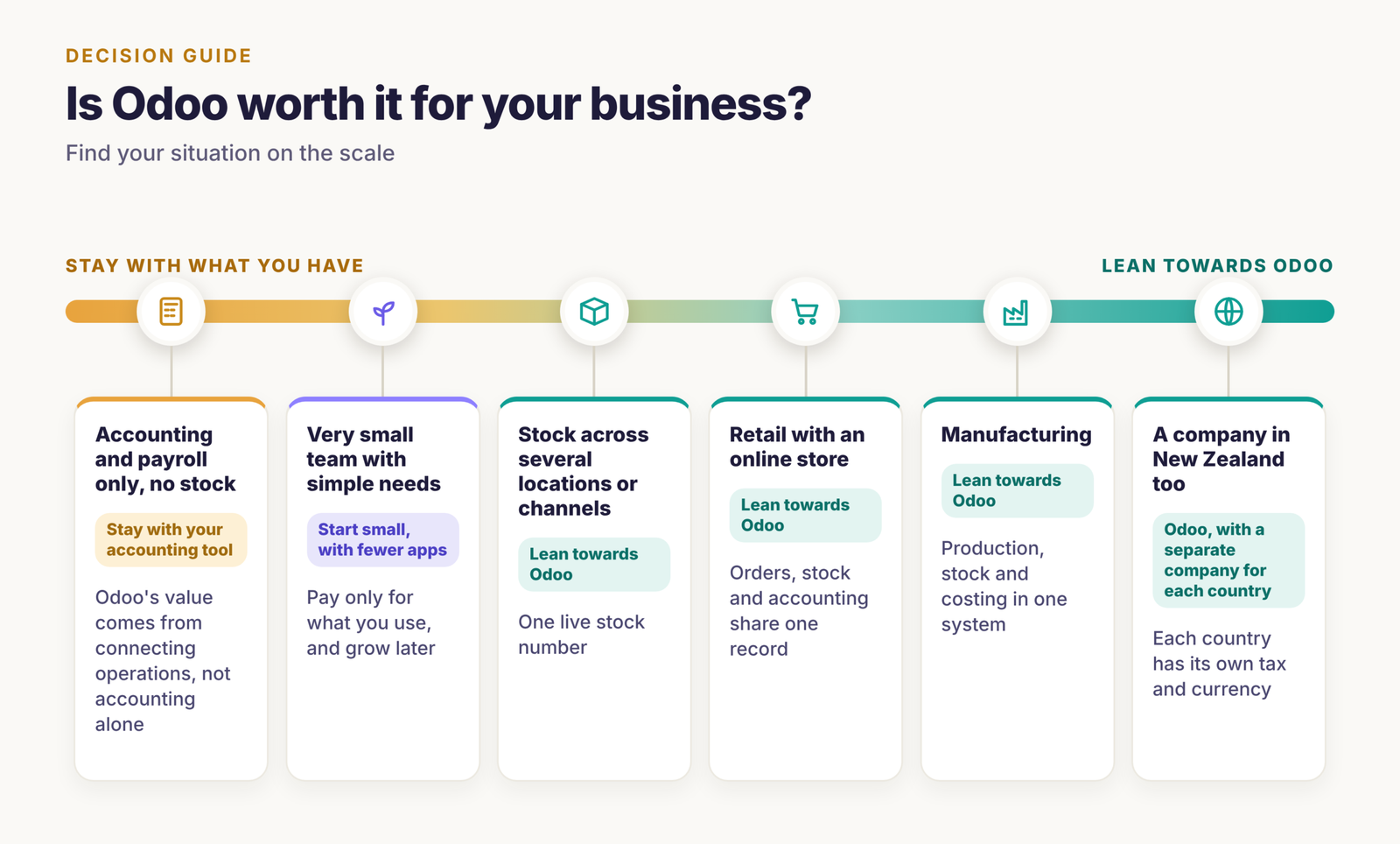
Odoo is worth the investment when your stock, sales channels or production are connected to your finances by hand today.
Your situation | Lean towards | Why |
|---|---|---|
Accounting and payroll only, no stock | Stay with your accounting tool | Odoo’s value comes from connecting operations, not accounting alone |
Stock across several locations or channels | Odoo | One live stock number through an Odoo inventory management solution |
Retail with an online store | Odoo | Orders, stock and accounting share one record, see our retail and eCommerce page |
Manufacturing | Odoo | Production, stock and costing in one system, see Odoo ERP for manufacturing and ERP for inventory and production |
A company in New Zealand too | Odoo, with a separate company for each country | Each country has its own tax and currency, see ERP software in New Zealand and ERP implementation in New Zealand |
Very small team with simple needs | Start small, with fewer apps | Pay only for what you use, and grow later |
If you make products, see how our manufacturing solutions fit as ERP software for manufacturers. For smaller teams, Odoo also works as business management software for SMEs that can add modules as you grow.
What you get back
- Time: less re-typing, fewer spreadsheet checks and faster month-end.
- Fewer errors: one stock number and one customer record instead of several.
- Room to grow: a new warehouse or channel still needs configuration and testing, but it builds on what you already have.
One of our engineering clients saw a 95% reduction in manual tasks after implementing Odoo ERP with Nexevolve. See the case study.

Five Costly Mistakes That Make Odoo Not Worth It
Most disappointing Odoo projects come from budgeting mistakes, not software problems.
- Comparing only the per-user price. The licence is the smaller part of year one. Ask for a five-year total.
- Customising before using standard features. Early custom work adds cost and delays go-live before you know what you really need.
- Paying for Custom before your data is clean. AI tools only help when your records are accurate.
- Leaving support and upgrades out of the budget. They arrive every year, so plan for them from the start.
- Choosing a partner on price alone. A low quote often leaves out migration, training or support.
A short scoping conversation settles most of these before you commit. Based in Sydney? See our Odoo partner in Sydney page, or read how we plan the work in our Odoo go-live checklist.
Conclusion
Is Odoo ERP worth it? For businesses that carry stock, sell through more than one channel or make products, it usually is, because the licence is only part of the cost and the savings come from connecting your work. For a business that is only accounting and payroll, it may not be. Add up the licence, implementation, support and your team’s time, set it against the hours Odoo would save, and let that comparison decide.
If you want an estimate based on your own requirements, users and modules, Nexevolve, an Odoo Silver Partner in Australia, can walk you through it with you. Book a free consultation to get one, or browse our case studies.